Connecting KEPServerEX with Modern HMIs to Legacy Modbus RTU Pumps
11981
419_488_71
71427321893
54121381948
91688
741
8888
519_7148
In Industrial facilities, maintenance managers can find themselves caught between two worlds. On the production floor, rugged and reliable Modbus RTU-based pumps continue to perform their duties perfectly. In the control room, high-performance Modern HMIs (like Ignition, FactoryTalk View, or Wonderware) demand high-speed, secure Ethernet data. This guide provides a comprehensive blueprint for using KEPServerEX as the mission-critical bridge that connects these legacy serial assets to the modern digital enterprise.
Why Modbus RTU Still Rules the Pump House
In the hierarchy of industrial protocols, Modbus RTU is the "grandparent" that refuses to retire. Developed in 1979, it remains the standard for pump manufacturers because it is incredibly robust over long distances (up to 4,000 feet over RS-485) and costs pennies to implement compared to Ethernet.
However, the paradox is that while the pump’s mechanical life might be 25 years, the digital life of the HMI software is often only 5 to 7 years. When you upgrade your HMI to a modern platform in 2026, you shouldn't be forced to replace a perfectly functional $20,000 pump just because it doesn't have an RJ45 port.
KEPServerEX as the Translator
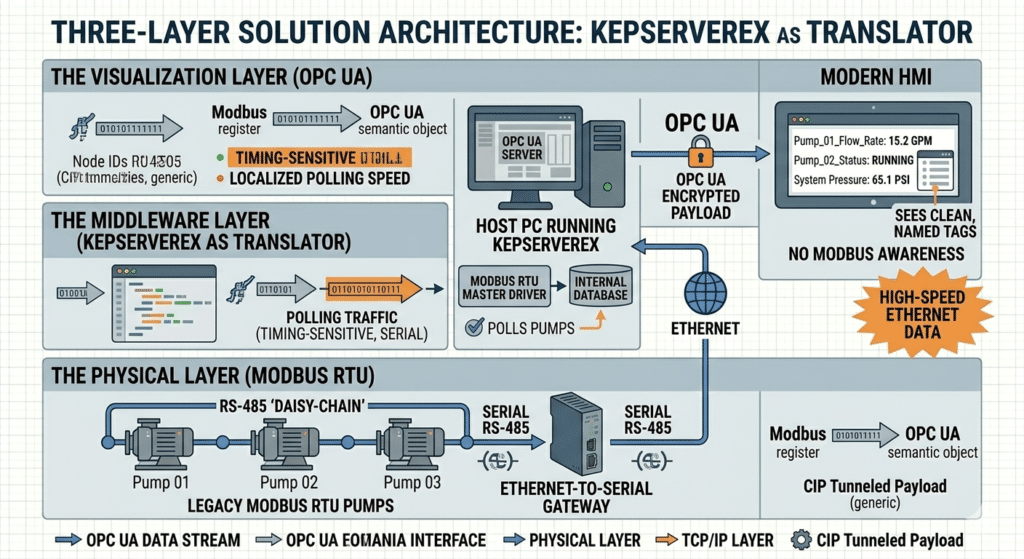
To bridge this gap, we implement a three-layer architecture. This setup ensures that the timing-sensitive serial communication doesn't interfere with the high-speed Ethernet network.
The Physical Layer: Modbus RTU pumps connected via RS-485 "daisy-chain" to an Ethernet-to-Serial gateway (like the ANC-120e or a generic serial server).
The Middleware Layer: KEPServerEX acts as the OPC UA Server. It "polls" the pumps using the Modbus RTU Master driver and stores the values in its internal database.
The Visualization Layer: The Modern HMI connects to KEPServerEX via OPC UA. It no longer cares about Modbus; it only sees clean, named tags like Pump_01_Flow_Rate
Maximizing Pump Performance
The biggest mistake engineers make when connecting legacy pumps is setting the "Scan Rate" too fast. Serial networks are slow. If you have 10 pumps on one wire and ask for data every 100ms, the network will "choke," and your HMI will show "Comm Failure."
Best Practices for Polling:
- Critical Data (Pressure/Flow): Poll at 500ms to 1s. This is fast enough for operator reaction but slow enough for the serial wire to breathe.
- Non-Critical Data (Motor Temp/Runtime): Poll at 5s to 10s. These values don't change rapidly.
- Write on Demand: Ensure your HMI is configured to only send "Start/Stop" commands when the button is pressed, rather than constantly writing the status.
Mapping Serial to Ethernet
Step
Parameter
Configuration Detail
Why it Matters
1
Baud Rate
9600 or 19200
Must match the pump's internal dip-switches.
2
Parity/Data Bits
8-N-1 (Usually)
Standard serial handshake protocol.
3
KEPServer Driver
Modbus RTU Master
Tells the software to speak the pump's "language."
4
Device ID
1, 2, 3... (Slave IDs)
Each pump on the wire must have a unique ID.
5
OPC UA Endpoint
opc.tcp://[IP]:49320
The address your HMI uses to find the data.
Wrapping the "Blue Hose" in a Digital Shield
Legacy Modbus RTU has no built-in security. If someone gains access to the serial wire, they can theoretically stop your pumps. By using KEPServerEX, you create a security perimeter:
Authentication: The HMI must provide a Username/Password or an X.509 Certificate to talk to KEPServerEX.
Read-Only Access: You can configure KEPServerEX to allow the HMI to see the pump status but prohibit it from changing the speed, protecting the pump from accidental or malicious over-pressurization.
VLAN Isolation: Keep the serial-to-Ethernet gateway on a private management VLAN that is not accessible from the public office network.
Modern HMIs thrive on "Objects." Instead of looking for 40001 (Modbus register), the HMI wants to see Pump_System.West_Wing.Pressure.
KEPServerEX allows you to perform Alias Mapping. You can take the cryptic Modbus address and give it a human name. Furthermore, you can perform Scaling inside KEPServer. If the pump sends a raw value of 0–4095 for a 0–100 PSI range, KEPServer does the math so the HMI receives the value already converted to "PSI."
Troubleshooting the Connection
If your HMI isn't getting data, follow this "Outside-In" checklist:
Check the Gateway: Are the TX/RX lights blinking on the serial gateway? If not, check the wiring polarity (A vs B).
KEPServer Diagnostics: Use the "Quick Client" in KEPServer. If the tags are "Bad" there, the issue is between the software and the pump.
OPC UA Connection: If the tags are "Good" in KEPServer but "Missing" in the HMI, check your firewall ports (Port 49320 is the default for KEPServer).
KEPServer Diagnostics: Use the "Quick Client" in KEPServer. If the tags are "Bad" there, the issue is between the software and the pump.
OPC UA Connection: If the tags are "Good" in KEPServer but "Missing" in the HMI, check your firewall ports (Port 49320 is the default for KEPServer).
Connecting KEPServerEX to legacy Modbus RTU pumps is the ultimate "middle-of-the-road" modernization strategy. It allows you to leverage the sophisticated visualization and data logging of a Modern HMI while respecting the long-term reliability of your mechanical hardware. In the industrial world, the best upgrade is the one that gives you new features without requiring you to throw away what already works.
Data Highway Plus to Ethernet (S02)
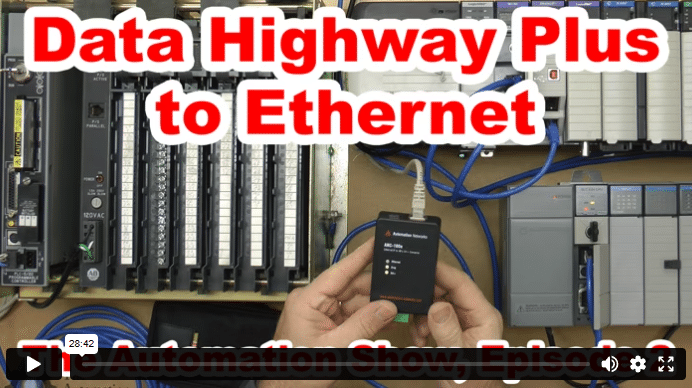
In today’s episode of The Automation Show, I unbox and setup an ANC-100e Data Highway Plus (DH+) to Ethernet Converter Data Highway Plus to Ethernet bridge from Automation Networks. For more information about the show (and how you could win an ANC-100E) check out the “Show Notes” located below the video. The Automation Show, Episode 2 Show Notes: NOTE: Would you like your … Continue readingData Highway Plus to Ethernet (S02)