Bridging Kepware KEPServerEX, Ethernet, and Legacy DH+ Networks
Industrial Internet of Things (IIoT) platforms, Advanced Analytics engines, Manufacturing Execution Systems (MES), and Enterprise Resource Planning (ERP) tools promise unprecedented insights into plant floor operations. They offer the ability to predict machine failures, optimize energy consumption, eliminate production bottlenecks, and dramatically improve Overall Equipment Effectiveness (OEE).
However, a massive obstacle often stands between a plant manager and these digital transformation benefits: legacy automation infrastructure.
Go into almost any high-output automotive, food and beverage, or chemical processing plant that has been running successfully for over two decades. Beneath the modern facade, you will find incredibly rugged, vintage workhorses: Allen-Bradley SLC 5/04 and PLC-5 controllers. These processors are legendary for their reliability; they simply refuse to die.
But their communication standard—Data Highway Plus (DH+)—is an entirely different story. Developed in the 1980s, DH+ is a token-passing network running at slow speeds (typically $57.6\text{ kbps}$ or $230.4\text{ kbps}$) over blue hose axial cable. It was never designed to handle the high-frequency, heavy data polling required by modern cloud analytics or plant-wide SCADA systems.
Attempting to flood an old DH+ blue hose network with thousands of modern data requests will instantly bottleneck the network, crash communications, drop critical alarms, and actually decrease plant efficiency.
Fortunately, you do not have to endure a multi-million-dollar "rip-and-replace" upgrade of your entire control system to solve this. Instead, you can leverage Kepware’s KEPServerEX combined with modern Ethernet-to-DH+ routing gateways to unleash hidden plant efficiency.
The Operational Cost of Information Silos
When your plant floor relies on isolated SLC 5/04 and PLC-5 processors trapped on DH+ networks, your facility suffers from hidden inefficiencies that quietly drain profitability:
Manual Data Logging: Operators must manually write down cycle counts, temperatures, or scrap rates on clipboards. This process introduces human error and creates a massive delay between data collection and management review.
Reactive Maintenance: Without real-time data streaming into a Centralized Maintenance Management System (CMMS), maintenance teams cannot track historical runtime hours or early warning anomalies. They remain trapped in a costly cycle of putting out fires.
Invisible Bottlenecks: If a conveyor line slows down slightly due to a mechanical wear issue on an SLC-controlled sub-assembly, it may go unnoticed for months, gradually eating away at daily throughput.
To fix this, we need to extract this data automatically, translate it cleanly to Ethernet, and funnel it into an optimization layer using KEPServerEX.
Hardware Routing to Ethernet
KEPServerEX cannot plug a standard PC Ethernet jack directly into a DH+ blue hose network. The software requires a hardware bridge to handle the physical and electrical translation.
The traditional, obsolete method involved putting an expensive, proprietary communication card (like an Allen-Bradley 1784-PKTX card) inside a desktop server. This required legacy PCI slots and outdated drivers that are completely incompatible with modern virtualized server environments or Windows 10/11/Server 2022.
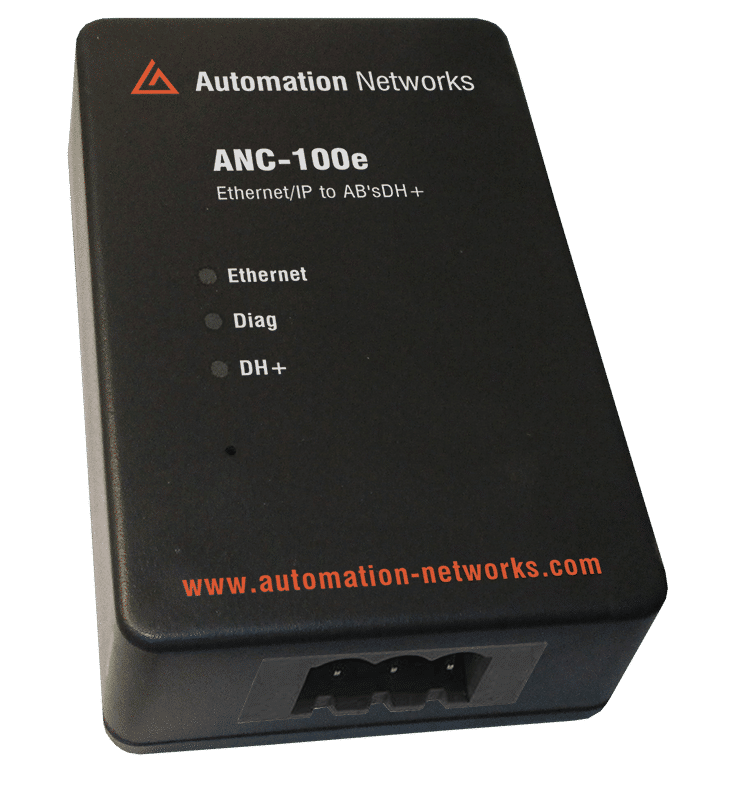
The modern, highly efficient solution is to deploy an external, network-attached gateway, such as a ProSoft Technology AN-X2-AB-DHRIO gateway or an Automation Networks ANC-120e cable.
How the Bridge Works:
The routing gateway sits inside your control panel. It connects to your modern, high-speed plant Ethernet switch via an RJ-45 cable on one side, and attaches directly to the 3-conductor DH+ Blue Hose network on the other side.
When KEPServerEX wants to read a register from a PLC-5, it sends a high-speed Ethernet/IP or CSP (Control and Information Protocol) packet to the gateway. The gateway instantly translates that packet into a native DH+ token frame, transmits it across the blue hose to the targeted node, extracts the reply, and shoots it back to Kepware over Ethernet at lightning speed.
Configuring Kepware KEPServerEX for Legacy Protocols
Once the physical hardware bridge is established, Kepware becomes the centralized translation engine for your facility. KEPServerEX excels at converting legacy Rockwell communication structures into unified, modern protocols like OPC UA, MQTT, or database-friendly ODBC streams.
To optimize your communications, you will configure two primary layers within the Kepware environment: Channels and Devices.
Step 1: Create the Channel
The Channel represents the physical communication medium on your server.
Step 2 : Open the KEPServerEX Configuration utility and click Click to add a channel.
Step 3: Select the Allen-Bradley ControlLogix Ethernet driver or the Allen-Bradley Ethernet driver, depending on your routing gateway's specifications (most modern bridges emulate a 1756-DHRIO routing module, meaning you will select the ControlLogix Ethernet driver).
Name your channel (e.g., Line1_DHPlus_Network).
Step 4 : Accept the default network adapter settings, ensuring it points to the network interface card tied to your plant floor industrial network.