
11981
419_488_71
71427321893
54121381948
91688
741
8888
519_7148
The SLC 5/05 stands as a pivotal "bridge" controller—one of the first to bring native Ethernet to the Allen-Bradley small-frame family. However, many plants still rely on the rugged PLC-5 or SLC 5/04 units living on Data Highway Plus (DH+) networks. This guide provides a technical deep-dive into how to execute peer-to-peer messaging between these platforms using the ANC-100e gateway to bridge the physical media gap without complex code changes.
Ethernet vs. DH+
The SLC 5/05 was a breakthrough because it replaced the proprietary DH+ or DH-485 port with a standard RJ45 Ethernet port. While this made it easy to connect to modern HMIs, it created a communication "silo" between the 5/05 and its older siblings.
The PLC-5 and SLC 5/04 speak DH+, a token-passing protocol. The SLC 5/05 speaks EtherNet/IP (or CSP in older firmware). To get them to talk, you need a hardware translator that can receive an Ethernet "Common Industrial Protocol" (CIP) packet and re-encapsulate it into a DH+ frame.
The ANC-100e as a Virtual Backplane
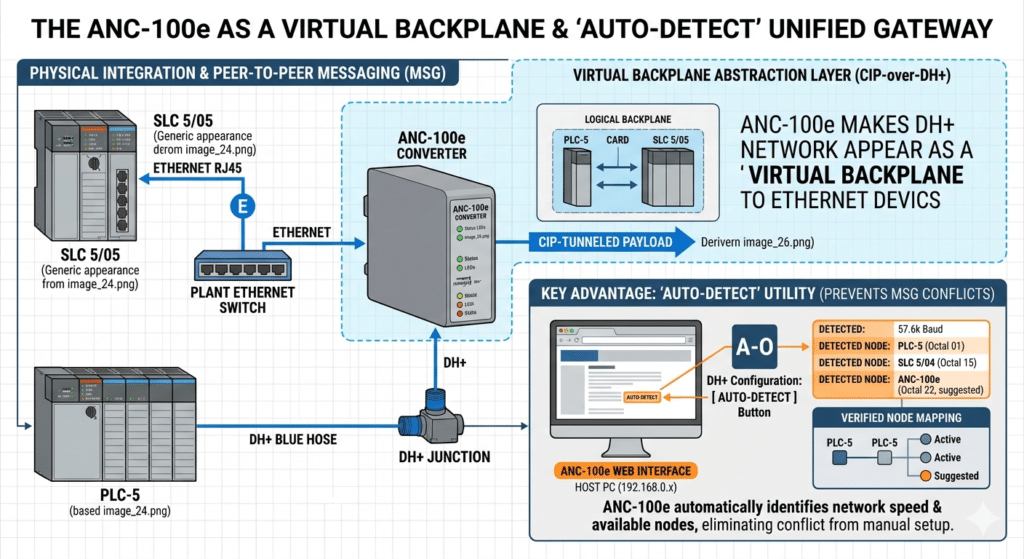
The ANC-100e acts as a high-speed gateway that essentially makes your DH+ network appear as a virtual backplane on your Ethernet network. This allows an SLC 5/05 to "see" a PLC-5 on DH+ as if it were simply another device on the local network.
Key Advantage: Auto-Detect
Setting up these bridges manually used to be a nightmare of calculating octal addresses and baud rates. The ANC-100e features an Auto-Detect utility that identifies the network speed (57.6k, 115.2k, or 230.4k) and maps out all active nodes automatically. This ensures that when you configure your MSG (Message) instruction, you are targeting a verified, active node.
Step-by-Step Configuration, SLC 5/05 to PLC-5
Phase 1: Physical and Network Setup
Connect the ANC-100e to your DH+ trunk (Blue Hose).
- Connect the ANC-100e to the same Ethernet switch as your SLC 5/05.
- Use the ANC-100e web interface (default IP 192.168.0.230) to run the Auto-Detect tool.
- Goal: Confirm the Octal address of the target PLC-5 (e.g., Node 15) and the baud rate.
Phase 2: Programming the MSG Instruction
In RSLogix 500, you will create a Message instruction in the SLC 5/05 logic.
- Type: Peer-to-Peer.
- Message Control: Create a unique MG file (e.g., MG9:0).
- Setup Screen Configuration:
Communication Command: PLC-5 Read or PLC-5 Write (The SLC 5/05 can "emulate" PLC-5 commands to maintain compatibility).
Data Table Address: The source/destination in the legacy PLC (e.g., N7:0).
Multi-Hop: This is the most critical setting. Set this to YES.
Phase 3: The Multi-Hop Tab
The Multi-Hop tab tells the SLC 5/05 how to navigate through the gateway:
- Hop 1: Input the IP Address of the ANC-100e.
- Hop 2: Specify the DH+ Octal Node of the target PLC-5 or SLC 5/04 (identified during the Auto-Detect phase).
Performance Optimization and "Scan Classes"
Because Ethernet is significantly faster than DH+, it is easy to "overwhelm" a legacy network with too many messages. If an SLC 5/05 hammers a DH+ network with 10ms updates, the legacy network will likely crash.
Best Practices for Stability:
Timer-Based Execution: Never trigger a MSG instruction on every scan. Use a timer (e.g., 500ms or 1s) to trigger the message.
Staggered Messaging: If messaging multiple PLCs, stagger the triggers so they don't all attempt to hit the ANC-100e simultaneously.
Data Packing: Instead of sending five messages for five different integers, pack those integers into a single contiguous integer file (N7) and send them in one single "Read" or "Write" block.
- Communication Command: PLC-5 Read or PLC-5 Write (The SLC 5/05 can "emulate" PLC-5 commands to maintain compatibility).
Data Table Address: The source/destination in the legacy PLC (e.g., N7:0).
Multi-Hop: This is the most critical setting. Set this to YES.
Data Highway Plus to Ethernet (S02)
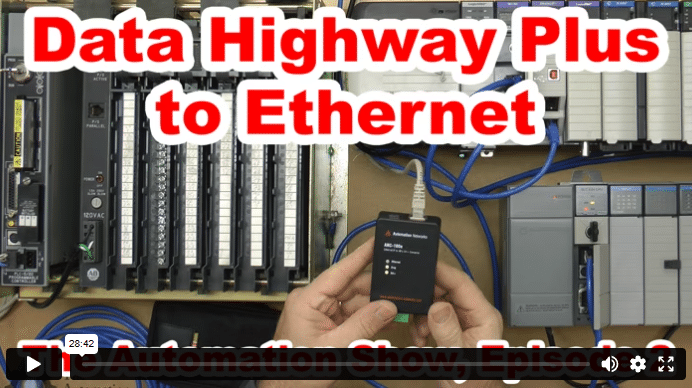
In today’s episode of The Automation Show, I unbox and setup an ANC-100e Data Highway Plus (DH+) to Ethernet Converter Data Highway Plus to Ethernet bridge from Automation Networks. For more information about the show (and how you could win an ANC-100E) check out the “Show Notes” located below the video. The Automation Show, Episode 2 Show Notes: NOTE: Would you like your … Continue readingData Highway Plus to Ethernet (S02)
