
Improving Ignition HMI to Legacy PLC-5 via ANC-100e
As we navigate the industrial landscape of 2026, the "Rip and Replace" philosophy is being challenged by a more sustainable, high-ROI alternative: Bridging. This 1,500-word guide deep-dives into how the ANC-100e Ethernet to DH+ Converter acts as the critical link between the modern Ignition HMI platform and the legendary Allen-Bradley PLC-5, unlocking unprecedented plant efficiency without the downtime of a full system overhaul.
Legacy Hardware vs. Modern Intelligence
In modern manufacturing, the pressure to adopt AI-driven analytics and "Agentic" SCADA systems has never been higher. However, a significant portion of the world’s critical infrastructure still runs on the Allen-Bradley PLC-5. These machines are reliable, but they speak a language—Data Highway Plus (DH+)—that modern software doesn't naturally understand.
The High Cost of Obsolescence
Ignoring these legacy systems creates "data silos." When your primary production line cannot communicate with your enterprise-level HMI, you lose:
OEE Visibility: You can't calculate Overall Equipment Effectiveness if you're manually transcribing data.
Predictive Maintenance: AI models need a high-frequency data stream that manual polling cannot provide.
Energy Efficiency: Without real-time load monitoring, you're likely overpaying for peak demand.
The ANC-100e Protocol Bridge
The ANC-100e is not just a converter; it is a gateway that provides a "Virtual Ethernet" presence for every node on your DH+ network. By converting DH+ signals into standard Ethernet/IP packets, it allows modern drivers—specifically the Ignition Allen-Bradley PLC-5 Ethernet Driver—to "see" the legacy controller as if it were a modern Logix processor.
Key Technical Advantages of the ANC-100e
Zero-Downtime Installation: Unlike internal bridge cards, the ANC-100e is an external, standalone unit that connects to the "Blue Hose" without stopping the PLC.
Auto-Baud & Auto-Polarity Detection: It automatically detects the network speed (57.6k, 115.2k, or 230.4k) and corrects for swapped wiring.
High-Speed Throughput: It is optimized for the high-frequency polling requirements of Ignition SCADA.
Configuring the Connection

To maximize efficiency, the configuration must be precise. This section follows the official Automation Networks technical blueprint.
Step A: Hardware Readiness
Ensure the ANC-100e is powered and connected to both the Ethernet switch and the DH+ network. For this example, we assume the ANC-100e IP is 192.168.0.230 and the target PLC-5 is at Node 03.
Step B: The Ignition Gateway Setup.
Launch the Gateway: Open the Ignition Gateway Control Utility and click "Go to webpage".
Device Configuration: Navigate to Config > OPC-UA Server > Devices.
Select Driver: Choose "Allen-Bradley PLC5" from the list of available Ethernet drivers.
Define the Hostname: Input the static IP of your ANC-100e (192.168.0.230).
The Connection Path: This is the most critical step. Use the format 1,1,2,NN, where NN is your DH+ node. For Node 03, the path is 1,1,2,3. See the following visual example
Maximizing Efficiency via Information Gain
Once the connection is established and the status shows "Connected: Protocol: DHRIO", the real work of improving plant efficiency begins.
Implementation 1: Real-Time Alarming
Instead of waiting for an operator to notice a fault light on a legacy panel, use Ignition to monitor bit-level changes in the B3 (Binary) files. You can set up SMS or Email alerts that trigger the moment a machine state changes, reducing Mean Time to Repair (MTTR).
Implementation 2: Historical Trending
By logging N7 (Integer) or F8 (Float) data to a SQL database via Ignition’s Historian, you can perform regression analysis.
Example: "Why does the PLC-5 on Line 4 experience more 'Watchdog' errors on Tuesday mornings?" You may find it correlates with a specific shift change or raw material batch.
Implementation 3: Edge Computing with the ANC-120e
If you have a technician who needs mobile, high-speed access to a PLC-5, the ANC-120e (USB to DH+ version) can be used with a laptop running a local Ignition Edge node.
This allows for "Local-First" diagnostics without taxing the main plant network.
Security in a Connected World

Connecting a legacy PLC-5 to an Ethernet network introduces security risks. In 2026, we recommend a Zero-Trust approach:
VLAN Isolation: Keep all ANC-100e devices on a dedicated "Legacy OT" VLAN.
Stateful Inspection: Use a firewall between the Ignition Server and the ANC-100e to ensure only OPC-UA traffic is permitted.
Read-Only Profiles: In the Ignition Gateway, you can configure the device connection as "Read-Only" to prevent accidental logic changes from the HMI.
Why Ignition HMI is the Preferred Partner
Ignition by Inductive Automation has become the industry standard in 2026 because of its "Unlimited" licensing and modular architecture. When paired with the ANC-100e, it provides:
The Native PLC-5 Driver: Ignition includes a specialized Ethernet driver that mimics the communication style of an 1756-ENBT/DHRIO bridge.
Unified Namespace (UNS) Support: You can map legacy N7 or B3 data registers into a modern, organized data hierarchy.
Cross-Platform Mobility: Access your PLC-5 data on smartphones, tablets, and remote workstations via Perspective or Vision modules.
ROI Comparison: Bridge vs. Upgrade
Metric
ANC-100e + Ignition Bridge
Full PLC-5 to ControlLogix Upgrade
Hardware Cost
Low (~$1.5k - $2.5k)
Very High ($20k - $100k+)
Engineering Time
2-4 Hours
2-4 Weeks
Wiring Risk
Zero (Blue Hose remains)
High (Total I/O rewiring)
Logic Risk
Zero (Logic remains same)
High (Conversion errors)
Downtime
None
Massive (Total Shutdown)
Verification and Troubleshooting
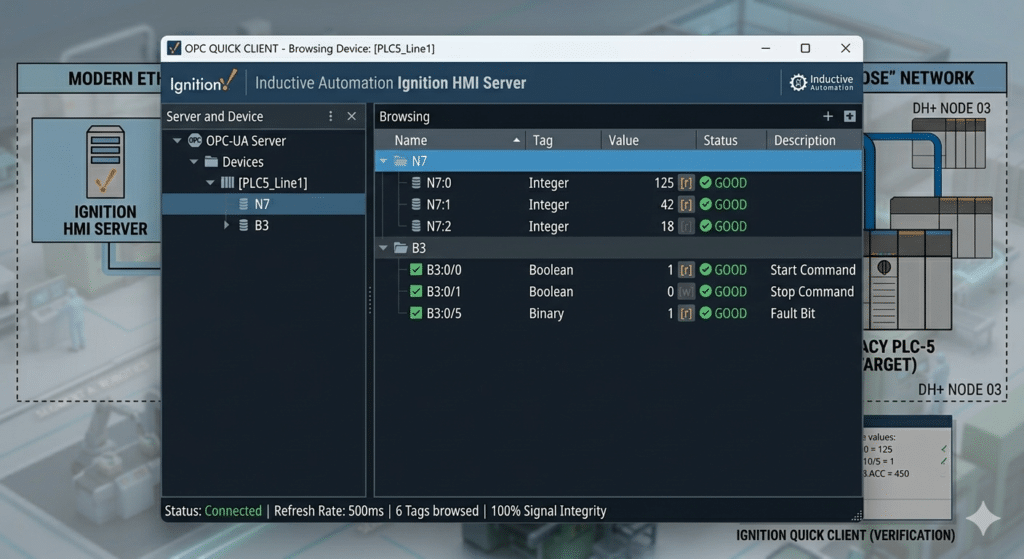
Efficiency is lost when data is unreliable. Always verify your connection using the Ignition Quick Client.
Browse to OPC Connections > Quick Client.
Expand the Devices folder and your specific PLC name.
Click the [r] icon next to a known changing value (like a timer or counter).
If the value updates in the browser, your bridge is successful.
Thanks Shawn from theautomationblog.com for your 20 minute product review video of the ANC-120e
USB To Data Highway Plus (DHP, DH+) – Using the ANC-120e, a lower cost alternative to the 1784-U2DHP
In today’s episode of The Automation Podcast I take a look at the ANC-120e USB to Data Highway Plus converter from Automation Networks. Now you may be asking yourself why the folks over at Automation Networks would release a USB to DH+ converter when Rockwell already makes the 1784-U2DHP? Well if you haven’t looked lately, that … Continue readingUSB To Data Highway Plus (DHP, DH+) – Using the ANC-120e, a lower cost alternative to the 1784-U2DHP
ANC-120e Application Notes/Documentation
ANC-120e: USB to AB's DH+ PLC Programming Cable
The ANC-120e is an economical and high performance USB-to-Allen-Bradley Data Highway Plus converter interfacing major HMI, SCADA, PLC Programming packages to Devices on DH+. Its features significantly outperform the Allen-Bradley 1784-U2DHP PLC Programming Cable operating at 12 Mg USB speed with the Controllogix Ethernet/IP Driver.
The ANC-120e works with all SCADA, MMI, PLC programming packages installed on your PC with USB direct access to the Allen-Bradley DH+ network and stations such as PLC-5 and SLC 5/04s. These packages include RSLINX/LOGIX Classic & Enterprise with RSLOGIX 5/500, Wonderware DAServer & TCP/IO Server, Citect, and Kepware using Controllogix Ethernet/IP Drivers.
$995 USD
January 1,2026
